Trill Training
Release, then press.
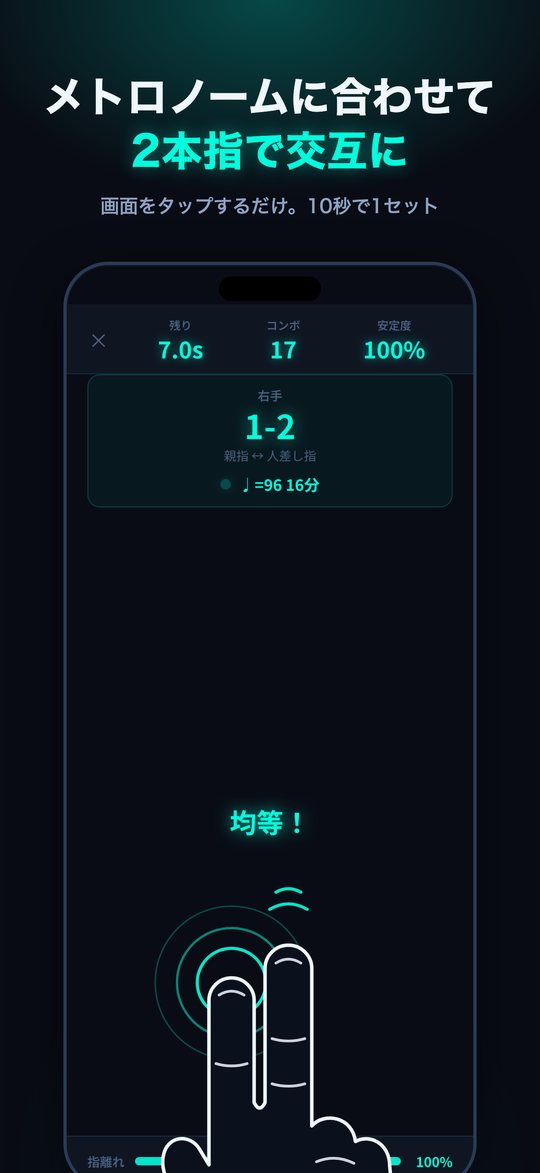
Most tangled trills come down to releasing, not pressing. Tap the screen with two fingers in turn and the app measures how evenly you strike and how quickly each finger lets go, one stroke at a time. Then raise the tempo step by step with the metronome.
Does your trill do this?
A trill that falls apart the harder you push it is rarely a speed problem. It is almost always about how evenly the notes fall and how cleanly each finger lets go.
- The notes of your trill are uneven
- Trills with the ring finger and little finger are hard
- You tense up and the trill falls apart when it goes on
- You cannot tell what exactly is wrong with your trill
- You want a short daily finger exercise you will actually keep up
Evenness and lightness, not speed
Pressing the next finger while the last one is still down, holding each note too long, a wobbling rhythm: almost every trill problem is one of these three. Trill Training records the interval between strokes and how long each finger stays down, one stroke at a time, and turns habits that are hard to hear into numbers.
- Even notes The spread of your stroke intervals is measured as Stability, so you can work toward a trill with no lumps in it.
- Independent fingers Five finger pairings on each hand are measured separately, so a weak ring finger or little finger shows up clearly.
- Relaxed hands The share of each interval that a finger stays down is measured as Release, so you can aim for a light touch that lasts.
No instrument needed; your phone is enough. A set lasts 10 seconds, so it fits into any spare moment.
Screens
What It Does
- Just tap the screen with two fingers in turn; no instrument needed
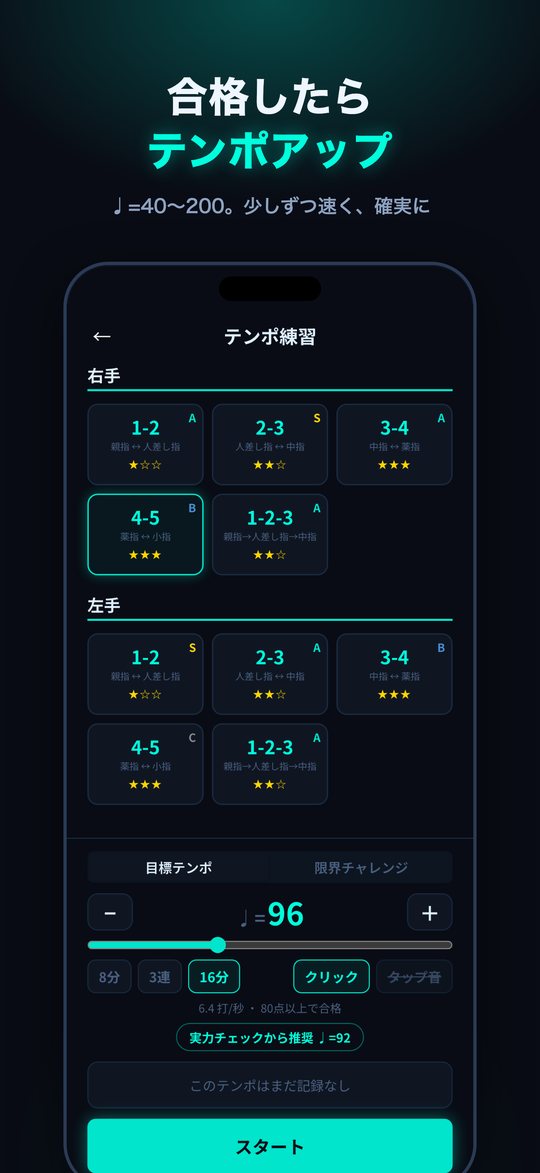
- Tempo Practice — ♩=40–200 with a metronome, scored out of 100
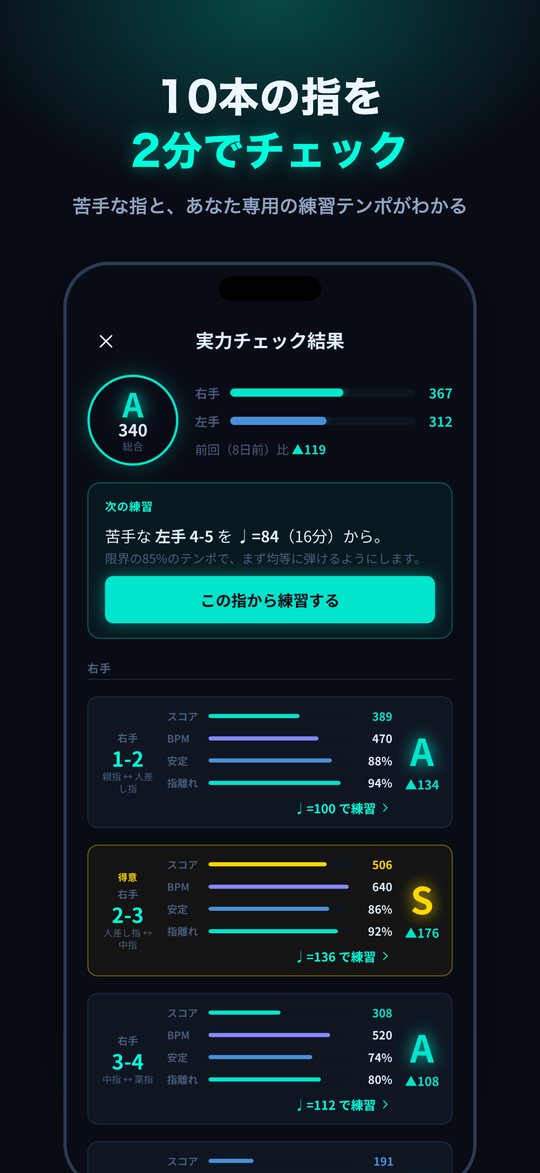
- Skill Check — all 10 patterns on both hands in about 2 minutes, with your weakest pair pointed out
- Limit Challenge — measure your current top speed
- Rhythm Trill — a rhythm game for a break
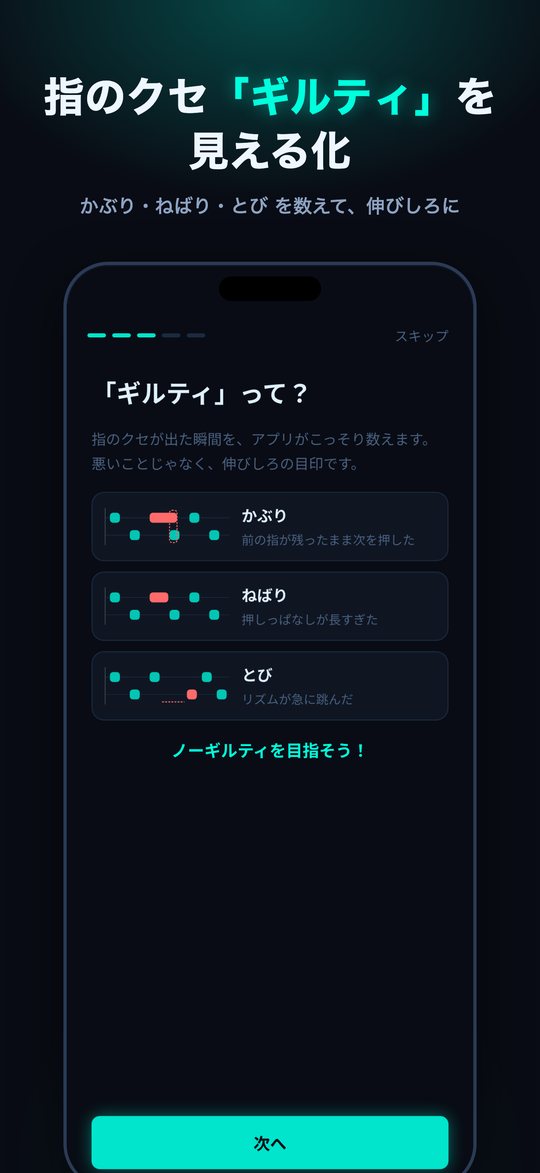
- Overlap, drag and skip flagged as "Guilty"
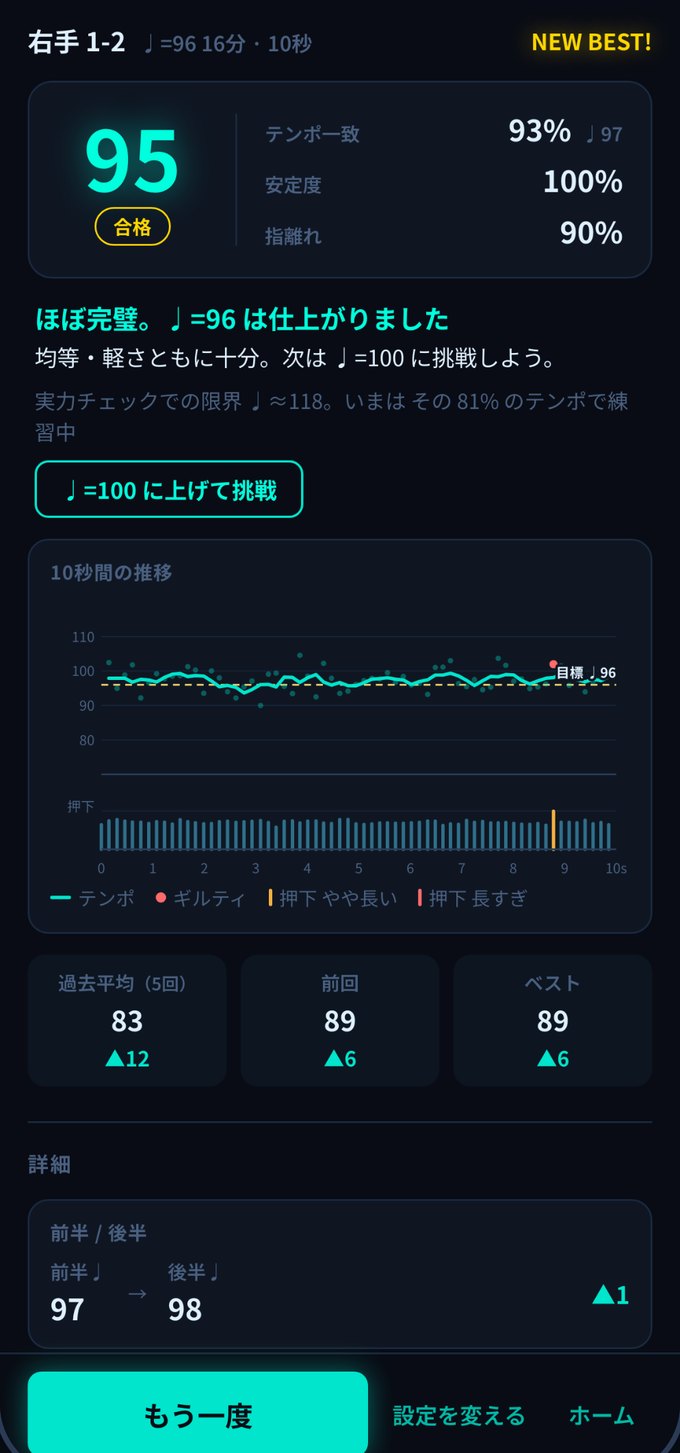
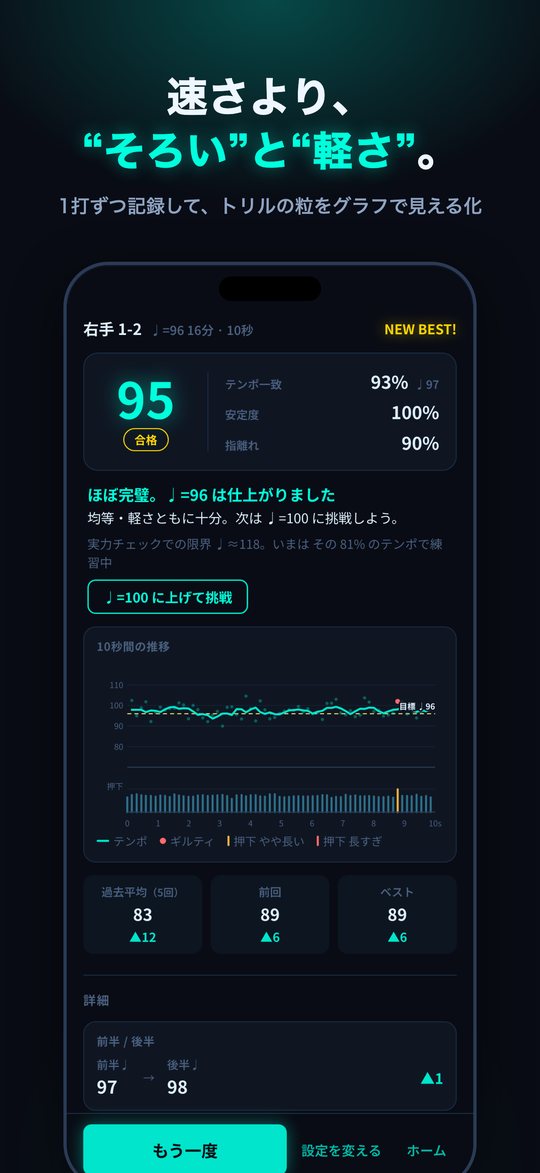
- Tempo and hold time for every stroke, plotted on a graph
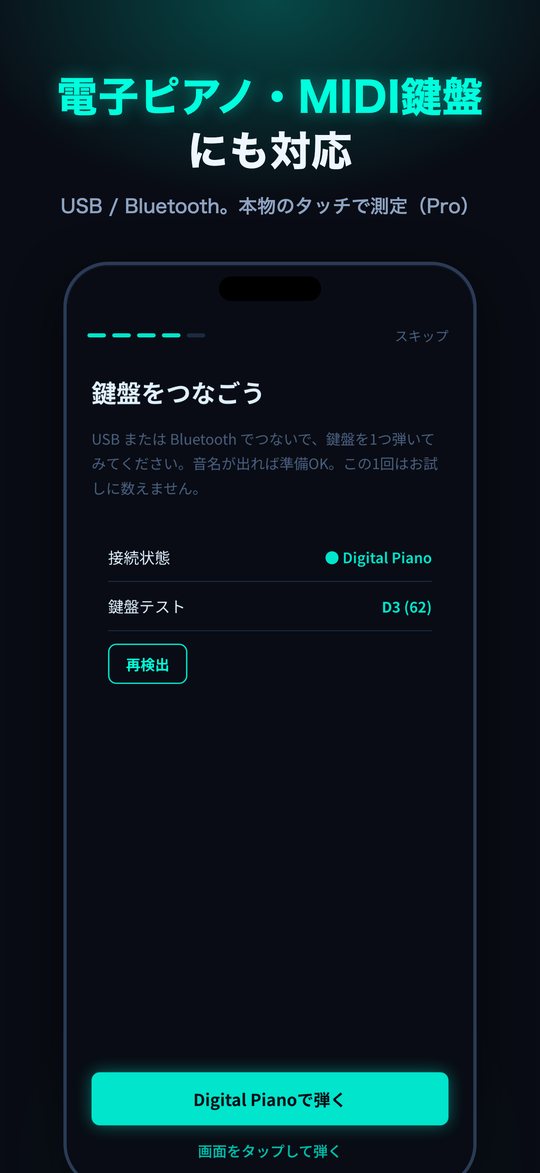
- Works with MIDI keyboards and digital pianos (USB / Bluetooth)
Practice Modes
Tempo Practice
Pick a tempo from ♩=40 to 200 and a subdivision of eighths, triplets or sixteenths, then play for 10 seconds with the metronome. Tempo match, Stability and Release are scored out of 100. Pass with 80 and the app suggests the next tempo, so you speed up gradually and surely.
Skill Check
All 10 patterns across both hands are measured in about two minutes and graded S to D. The app points out your weakest pair and suggests a practice tempo made for you (85% of your limit). Results are kept by date, so you can see your progress against the previous check at a glance.
Limit Challenge
No set tempo: measure the fastest trill you can play right now.
Rhythm Trill
A rhythm game for a break: tap along to notes falling down two lanes.
Finger Patterns (both hands)
| Pattern | Fingers | Difficulty |
|---|---|---|
| 1-2 | Thumb ↔ index | ★☆☆ |
| 2-3 | Index ↔ middle | ★★☆ |
| 3-4 | Middle ↔ ring | ★★★ |
| 4-5 | Ring ↔ little | ★★★ |
| 1-2-3 | Thumb → index → middle | ★★☆ |
How Scoring Works
Every measure is a ratio that does not depend on tempo, so playing fast is not rewarded over playing slowly and carefully.
| Measure | What it looks at | Weight |
|---|---|---|
| Tempo match | How close your average interval is to the target tempo | 30% |
| Stability | How little the intervals vary | 40% |
| Release | How short a part of each interval the finger stays down | 30% |
In Tempo Practice, 80 or above is a pass. Skill Check and Limit Challenge grade you from S to D with a score that multiplies stroke speed, Stability and Release.
Your habits, flagged as "Guilty"
Each time a habit shows up, the app counts it as a "Guilty". It is not a telling-off, just a marker of where you can improve. Aim for zero.
| Guilty | What happened |
|---|---|
| Overlap | You pressed the next finger while the last one was still down |
| Drag | You held the note down too long |
| Skip | The rhythm suddenly jumped |
Stroke-by-Stroke Analysis
After each set you can review every stroke from those 10 seconds. The comment picks out just one thing, your biggest room for improvement, so you know exactly what to focus on next.
- Tempo and hold time for every stroke, plotted on a graph
- First-half and second-half tempo compared, so you can see any slowdown in numbers
- Comparison with your past average, previous set and personal best
- Skill Check results kept by date, with the gain since last time
- Jump straight to practicing your weakest pair at the suggested tempo
Who It Is For
A good fit if you
- Want to play trills and tremolos evenly
- Want to build independence in the ring and little fingers
- Want to get a feel for playing relaxed
- Want to practice fingerwork away from the piano
- Want to measure your real touch on a digital piano or MIDI keyboard
Not the right fit if you
- Want to practice whole pieces (this app is for trill fundamentals)
- Want to work on dynamics or tone (it measures timing and hold time only)
- Need an interface in a language other than Japanese (the app is in Japanese only)
Free / Pro Plans
| Free | Pro (one-time purchase) | |
|---|---|---|
| Tempo Practice / Skill Check / Limit Challenge | ○ | ○ |
| Rhythm Trill | ○ | ○ |
| Guilty flags / stroke-by-stroke analysis | ○ | ○ |
| Theme colors (6) | ○ | ○ |
| Set length | 10 s | 10 s / 30 s / 60 s |
| Comparison with past sets | Last 5 | Your full history and trends |
| Practice on a MIDI keyboard / digital piano | 3 free tries | ○ |
| Ads | None | None |
Pro is a one-time purchase that is yours for good, with no subscription. Pro features added later are included at no extra cost. Connecting a MIDI keyboard and testing its keys is unlimited in the free version too.
Restore Purchase
If you change devices or reinstall the app, open Settings, go to Trill Training Pro and choose Restore Purchase. You must be signed in with the same Apple ID.
Change your trill, starting with 10 seconds today
Start with a Skill Check and find out which fingers are strong and which need work.
Download on the App StoreSupport
Settings, connecting a MIDI keyboard, and frequently asked questions.
Settings
| Item | Description |
|---|---|
| Sound | Turn all sound, tap sounds and the metronome on or off separately. Tap sounds play very slightly late, so turn them off if they pull your rhythm |
| Theme color | Choose an accent color from six |
| Set length | 10 s / 30 s / 60 s (30 s and 60 s with Pro) |
| MIDI keyboard | Check the connected keyboard, rescan and test keys |
| Show the guide again | Replay the first-launch guide |
| Trill Training Pro | Buy Pro or restore a purchase |
| Data | Delete all records (cannot be undone) |
Connecting a MIDI Keyboard or Digital Piano
- Connect your MIDI keyboard or digital piano to your iPhone by USB or Bluetooth (USB may need an adapter)
- Open the keyboard connection screen in the app and check that your keyboard name appears
- Play one key; when its note name appears you are ready (this key test does not count as a trial)
- Play two keys in turn to practice your trill
When you play on a MIDI keyboard, the app does not play tap sounds, so they do not clash with the keyboard. With Bluetooth earphones, sound may reach you slightly late.